
Meal Order and Meal Tag App “Shokusatsu-kun” Connecting Care Facilities and Kitchens (age-Age corporation)
Meal types and allergies differ for every resident, and changes happen almost every day. We replaced a paper-and-manual meal service at elderly care facilities with a system in which “every change reliably reaches everyone.”
※ お客様の守秘義務に配慮し、匿名・抽象化した事例として掲載しています。
Related link株式会社age-Age corporation 公式サイト
背景
At elderly care facilities, each resident has a different meal type (minced, blended, pureed, and so on), therapeutic diet, allergies and foods they cannot eat. The “meal order sheet” that records this arrives on paper for each facility, and its contents change frequently.
At the company that provides the meals, staff made meal tags (name and meal-detail tags placed on each tray) from the meal order sheets, copied the details onto a meal count sheet posted on the refrigerator, and re-entered everything into an Excel file for the month-end totals. Changes were mostly communicated face to face, so the site bore the burden of copying the same information over and over and of keeping everyone aware of the latest details.
“We want to be told when a meal order sheet is updated.” “We want to see the meal counts totaled up.” These were the two requests we heard from the site at the first meeting.
取り組み
We organized the flow that starts from the paper meal order sheet so that facilities, the kitchen and administrators each work on their own screens. We kept on-site routines such as replacing meal tags, and left only the laborious copying and totaling to the system.
- A screen for each role
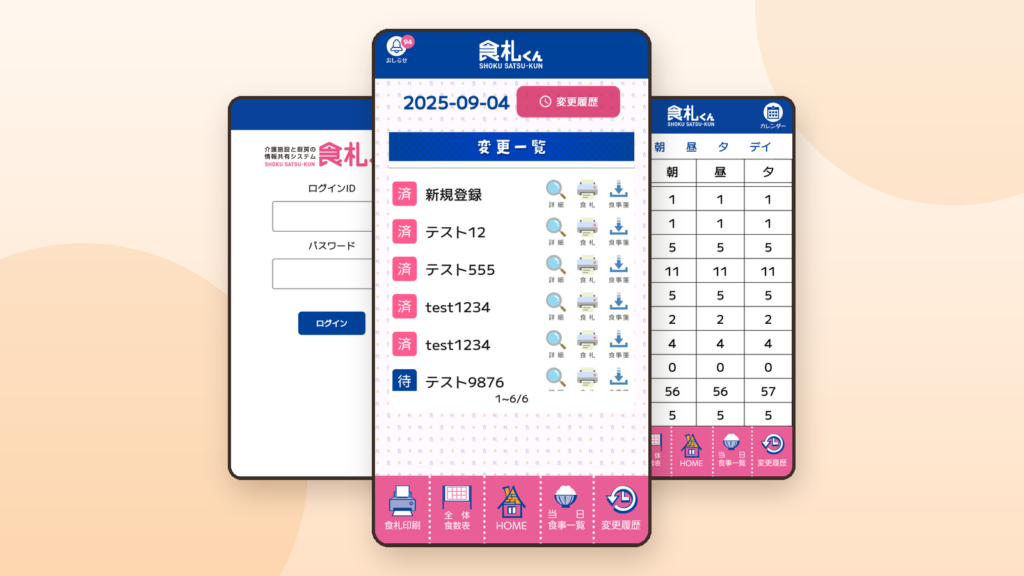
Facility staff register and edit meal order sheets, the kitchen checks changes and prints meal tags, and administrators manage everything. Each user sees only the menus they need, based on who is logged in. - Registering and editing meal order sheets
You can enter the meal type; rice, soup, bread, noodles and snacks; therapeutic diet; allergies and prohibited foods; and even the period and number of meals. Everything you enter is kept as a change history. - Notifications and badges that deliver changes right away
When a meal order sheet is registered or edited, a notification goes to the smartphones of both the facility and the kitchen, and the number on the app icon (badge) shows unconfirmed changes at a glance. We even refined how notifications are issued—for example, the device of the person who made the change stays silent and only updates its badge. - Print data for meal tags, created automatically
Select the meal order sheets that changed and output the meal tags as a PDF. Based on a hand-drawn draft of a meal tag, we decided the layout of the items and the color coding together with the site. - Overall meal count sheet
Meal counts by meal type are totaled and displayed automatically for breakfast, lunch, dinner and day service. Copying onto the sheet on the refrigerator and the month-end totaling are no longer needed. - Meal cancellation (stopping meals)
Just choose the period and which meal to cancel—breakfast, lunch, snack or dinner. A confirmation screen is also provided to prevent operating mistakes. - A screen that never confuses staff
Large text, with color coding and illustrations that make items easy to tell apart. It is designed so that even staff who are not comfortable with computers can use it without hesitation. - OCR to assist input
We added a function that reads a meal order sheet from an image and fills in the entries.
進め方
First, we drew the current workflow as a diagram and decided together “what the system takes over and what stays with the site.” For the meal tags, we decided the layout of items and the colors based on a draft that the staff on site had drawn by hand.
Development proceeded by first raising the completeness of the web admin screen for the client to review, and then narrowing down the functions the app needed. Because it is hard to imagine how something will feel to use from screen designs alone, we decided things while looking at working software.
Once in operation, we standardized on receiving requests through a sheet and chat, turning each one into a ticket, handling it, and reporting when it is done. Because the app is used only by facility staff, we distributed the iPhone version as an unlisted app that does not appear in App Store search.
成果
- Changes to meal order sheets now reach the facility and the kitchen through smartphone notifications and badges
- Print data for meal tags and the overall meal count sheet are now prepared automatically from the meal order sheets that were entered
- We keep adding functions as on-site operations change, such as meal cancellation and new meal types
- Since going live, we have also handled a server migration and PHP version upgrades, so the system can keep being used with peace of mind
この事例に関するよくある質問
Yes. This project also started with paper meal order sheets and manual copying. You can start by consulting us on drawing a diagram of your current workflow and deciding together what to hand over to the system and what to keep on site.
We care about building screens that fit the people who use them. In this project we used large text, color coding and illustrations so that items are easy to tell apart and nobody gets lost.
Yes. In this project too, after going live we added history, the overall meal count sheet, meal cancellation, OCR input and more, in line with the site’s requests. We take requests through a sheet and chat, turn each into a ticket, handle it, and report when it is done.
Yes. Because only facility staff use it in this project, the iPhone version is distributed as an unlisted app that does not appear in App Store search.
関連するサービス
Ask about cases like yours.
"Have you done something similar in our industry?" — we welcome exactly that question. Feel free to ask.